



Discover RosiMosi Lessons a guided learning experience where education meets play designed by teachers and proven to boost skills
RosiMosi is always looking for ways to make learning meaningful and fun for children. Our Lesson Builder feature is designed to do exactly that.
With the Lesson Builder, we give parents and educators a simple way to turn the app’s activities into structured lessons that focus on the skills children need most.
The Lesson Builder helps children practice step by step, keeping them engaged while supporting real progress. Parents can feel confident that their children are following lessons that are educationally sound, without having to plan or research each activity themselves.
Using the Lesson Builder is simple:
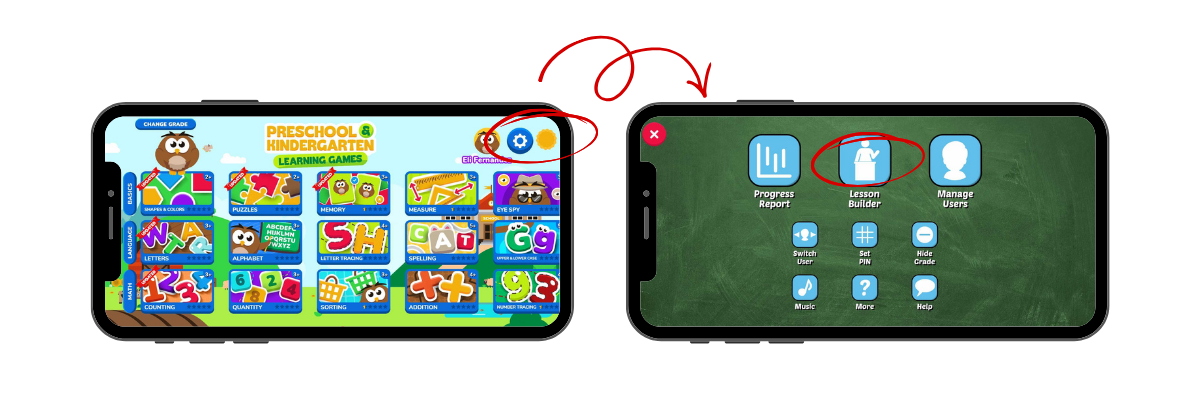
- Open the RosiMosi app and go to the gear icon (⚙️) in the top right corner. Press and hold it for three seconds. Tap the Lesson Builder icon.
- Select the activities your child needs to practice, then click Run Lesson. You can choose how many times each activity will repeat within the lesson. This makes it easy to give extra practice for skills that need reinforcement.
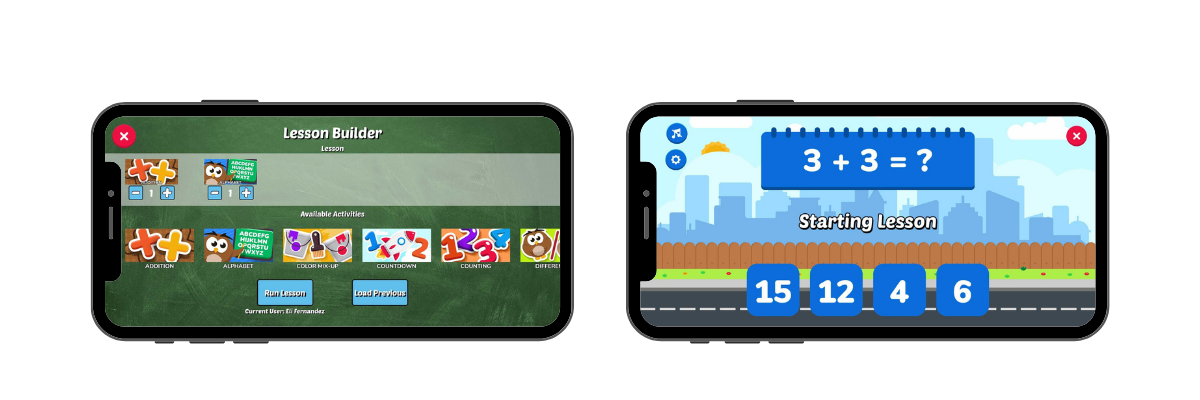
Once the lesson starts, your child cannot exit it. This helps them stay focused and motivated from start to finish.
With the Lesson Builder, children move through activities in a purposeful order rather than jumping between games. This structure supports learning at the right level for their age, reinforces important skills, and makes the learning experience more rewarding. Whether children are reviewing a topic, catching up on a skill, or exploring something new, the Lesson Builder ensures every activity contributes to real understanding.
The Lesson Builder is available inside the RosiMosi app and is ready to use anytime you want meaningful and fun learning.

